The Complete RagLeap Guide — Every Feature, Explained Step by Step
How to set up and run an AI business manager that answers customers on WhatsApp, Telegram, Discord, and real phone calls — with its own memory, its own knowledge base, and an executive assistant for the owner. This is the complete walkthrough, feature by feature, with real screenshots.
TC Antony
Founder, RagLeap - July 2026
Most AI chatbot tools do one thing: answer questions on a website widget. RagLeap is built differently — it's a full AI business manager that runs across five channels (Web, WhatsApp, Telegram, Discord, and real Voice calls), remembers facts permanently instead of forgetting them at the end of a session, and gives the business owner a private executive assistant that can see and control the whole operation.
This guide covers every feature in the order you'd actually encounter them — from your first login to running a live voice-answering phone line. If you're evaluating RagLeap, onboarding a team member, or just want the complete picture of what's possible, this is it.
Table of Contents
- Dashboard — Your Home Screen
- RagLeap Manager — Your AI Executive Assistant
- AI Employees — A Specialized Team, Not One Bot
- Documents — Building Your AI's Knowledge Base
- Integrations — Connecting Your Existing Tools
- n8n Workflows — No-Code Automation
- Voice AI — Answering Real Phone Calls
- WhatsApp Business Bot Setup
- Telegram Bot Setup
- Discord Bot Setup
- Database — Cloud vs. Self-Hosted
- Billing & Analytics — Credits and Costs
- Persistent Memory Dashboard
- Language Settings — 222+ Languages
- AI Settings — Model, Temperature, Your Own API Key
- Account — Plans, Team, Billing
- Audit History
- AI Chat — Testing Before You Deploy
- Embedding the Chatbot on Your Website
- Frequently Asked Questions
1. Dashboard — Your Home Screen
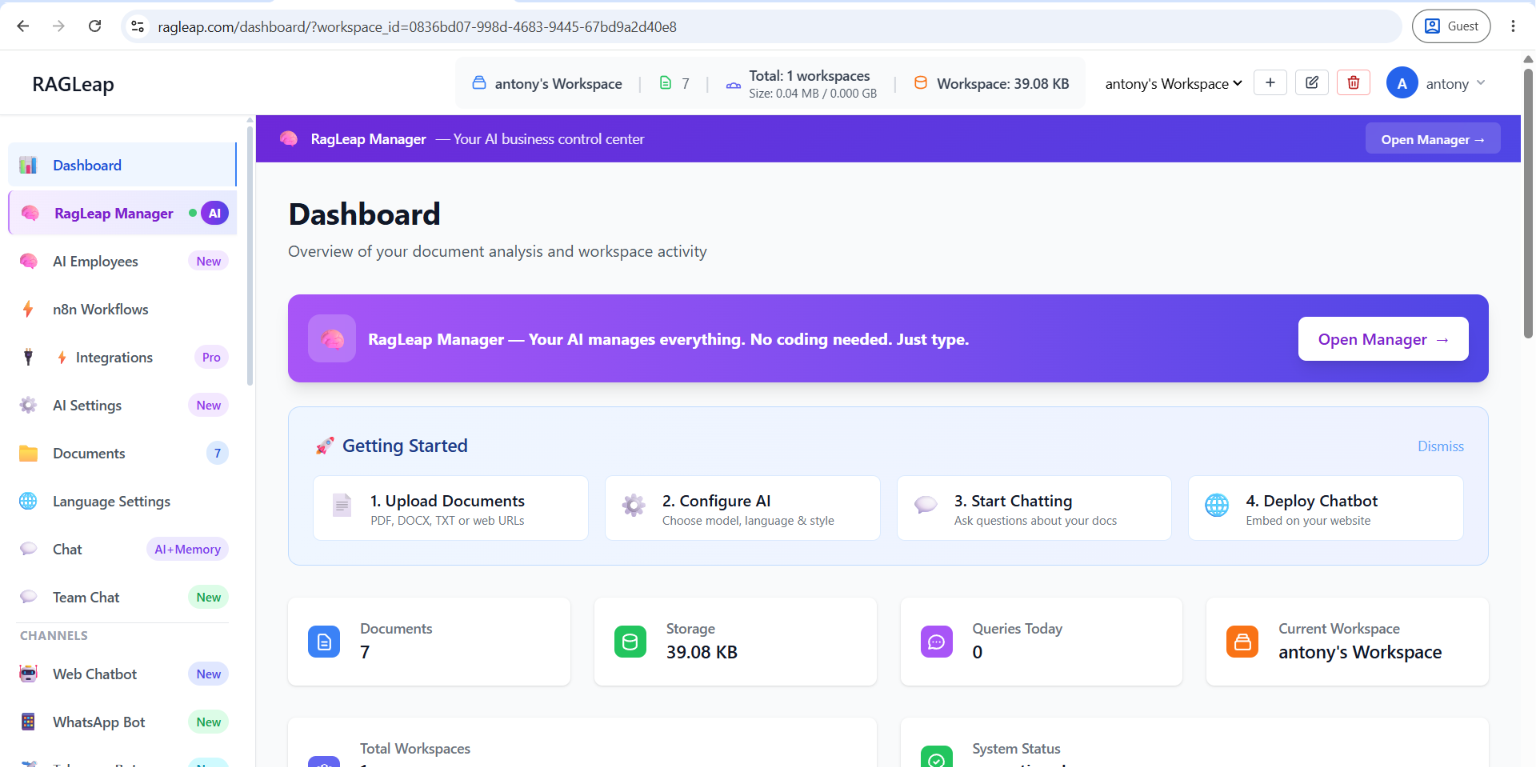
Every session starts on the Dashboard. It's designed to answer one question at a glance: is everything working, and what happened while I was away?
The top bar always shows your current workspace name, document count, total workspace size, and a workspace switcher — useful the moment you're managing more than one business or client under a single account.
What's on the page:
- Getting Started checklist — four cards for first-time setup: Upload Documents, Configure AI, Start Chatting, Deploy Chatbot. Dismissible once you're past onboarding.
- Quick stats row — Documents count, Storage used, Queries Today, Current Workspace.
- Workspace stats row — Total Workspaces (with size) and System Status (operational/degraded).
- RAG Quality panel — retrieval benchmark scores: nDCG@k, Hit@k, MRR@k, and Recall@k. This measures whether your AI is finding the right source document for a test query — not whether the written answer itself is worded correctly. A score above roughly 0.9 is considered healthy.
Think of the Dashboard as your morning check-in: confirm system status is green, glance at query volume, and move on.
2. RagLeap Manager — Your AI Executive Assistant
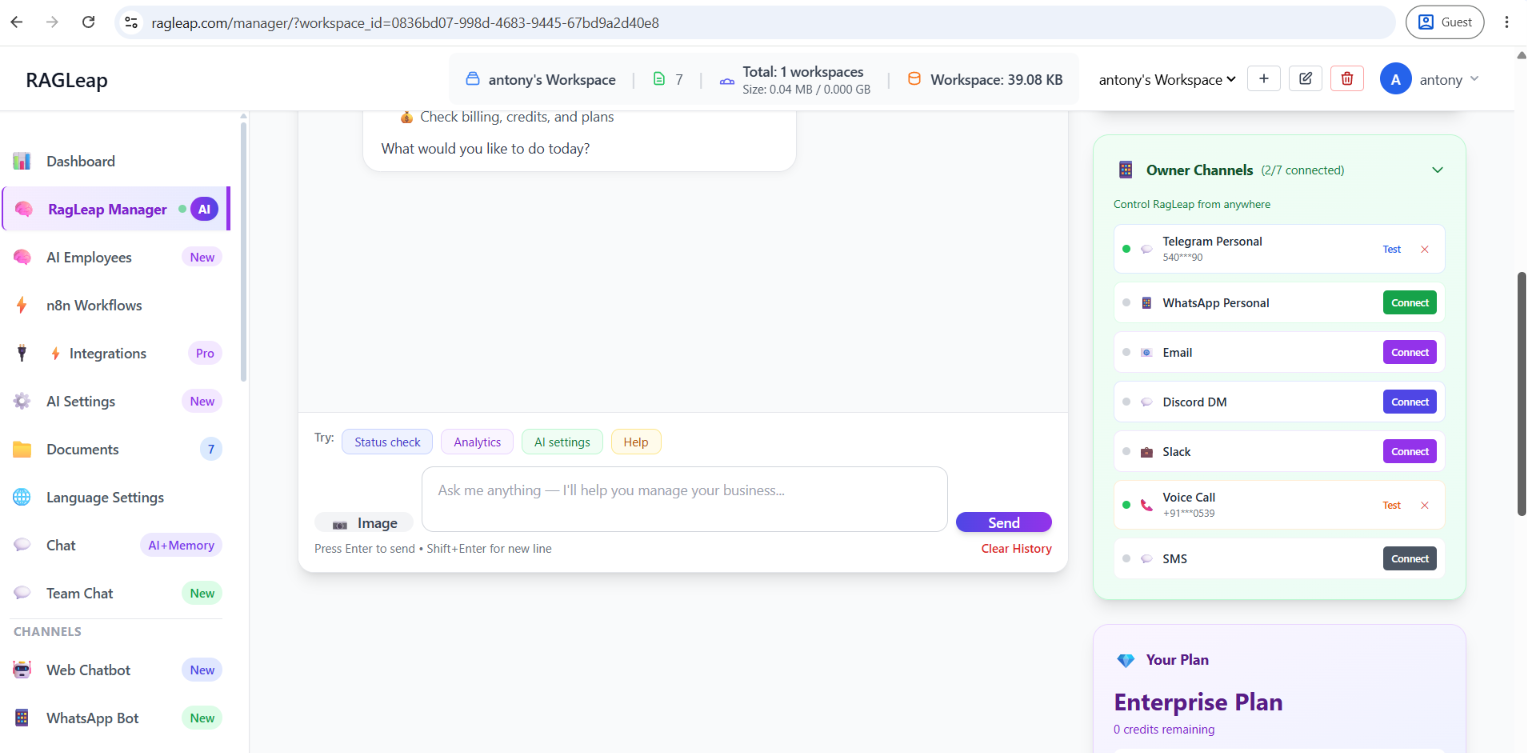
This is the single feature that separates RagLeap from a typical customer-support chatbot. RagLeap Manager is a private AI executive assistant — accessible only to the workspace owner, never visible to customers — reachable through four channels:
| Channel | How to access it |
|---|---|
| Web | ragleap.com → Manager AI tab |
| Telegram | Your personal Telegram bot |
| Your personal WhatsApp bot | |
| Voice Call | Call your Twilio number from your verified mobile |
What Manager AI can actually do:
- See everything — all documents (public and private), analytics, team permissions, database connections, channel configuration, credit balance
- Execute real operations — configure channels, connect and query databases, generate and export reports (PDF, Excel, CSV), send emails on your behalf, invite or remove team members, change AI settings and model, deploy customer automations
- Analyze — sales analysis, financial analysis (P&L, cash flow, invoices), business strategy, and customer behavior, either from your documents or a live connected database, answered in plain English
Because Manager AI runs on persistent memory (see Section 13), a conversation you start on Telegram is remembered when you switch to a phone call or the web app. It behaves like one continuous assistant, not five separate bots that forget everything between channels.
3. AI Employees — A Specialized Team, Not One Generic Bot
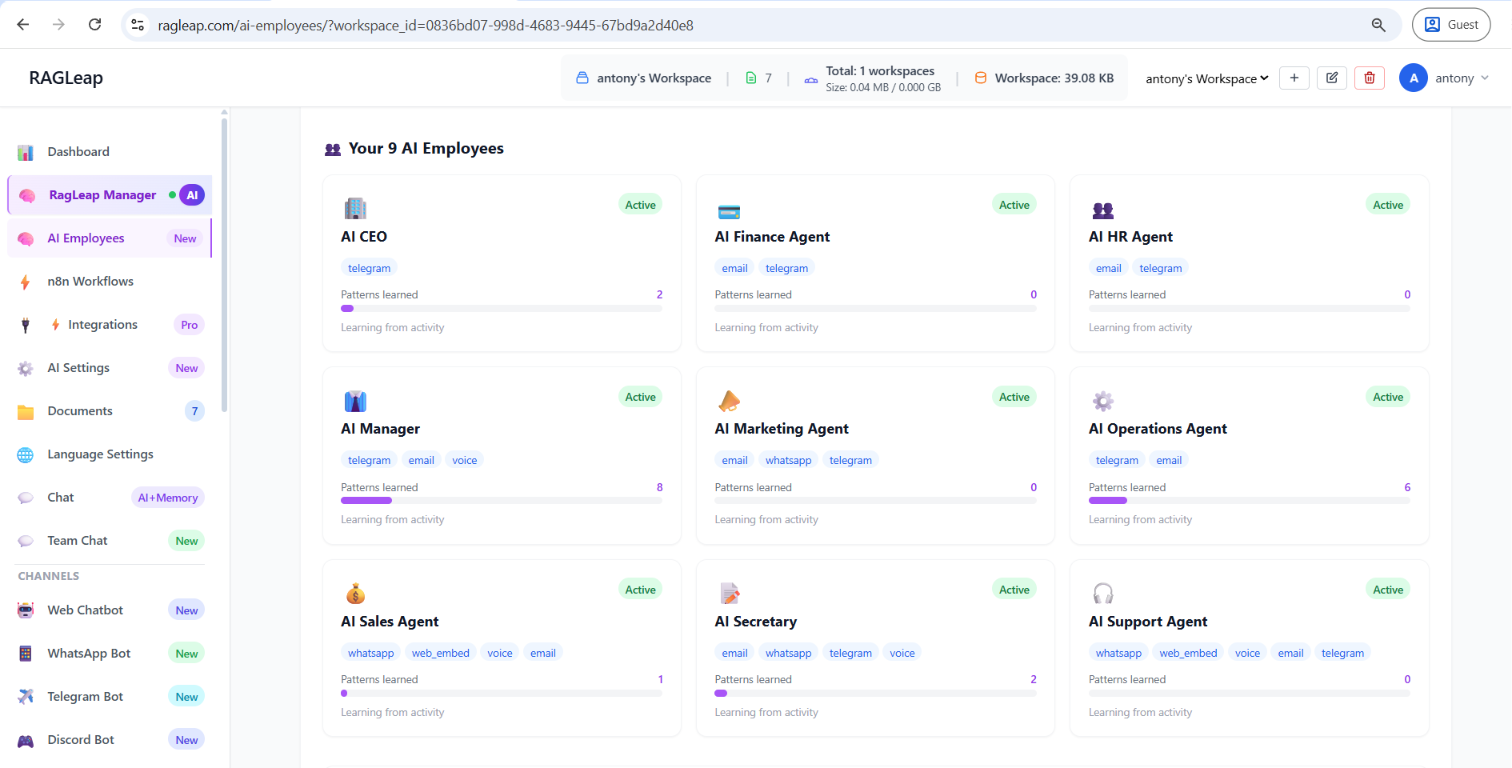
Most AI chatbots use one generic prompt for every conversation. RagLeap instead seeds every new workspace with a set of AI Employee roles out of the box — each carrying its own permanent memory and area of expertise, so a sales-related question and a support-related question draw on different context automatically.
How the learning system works:
- Roles are seeded automatically the moment your workspace is created
- Each role's skill context is injected into whichever channel handler is active — voice, WhatsApp, web chat, or Telegram — based on what the conversation actually needs
learn_from_conversation()runs across every channel, meaning real customer conversations can add new permanent memory over time, not just improve within a single session- A weekly automatic learning task reviews all workspaces and reinforces patterns every Sunday
Manage and inspect every role at /ai-employees/ — see each one's memory entries and recent learning activity directly.
4. Documents — Building Your AI's Knowledge Base
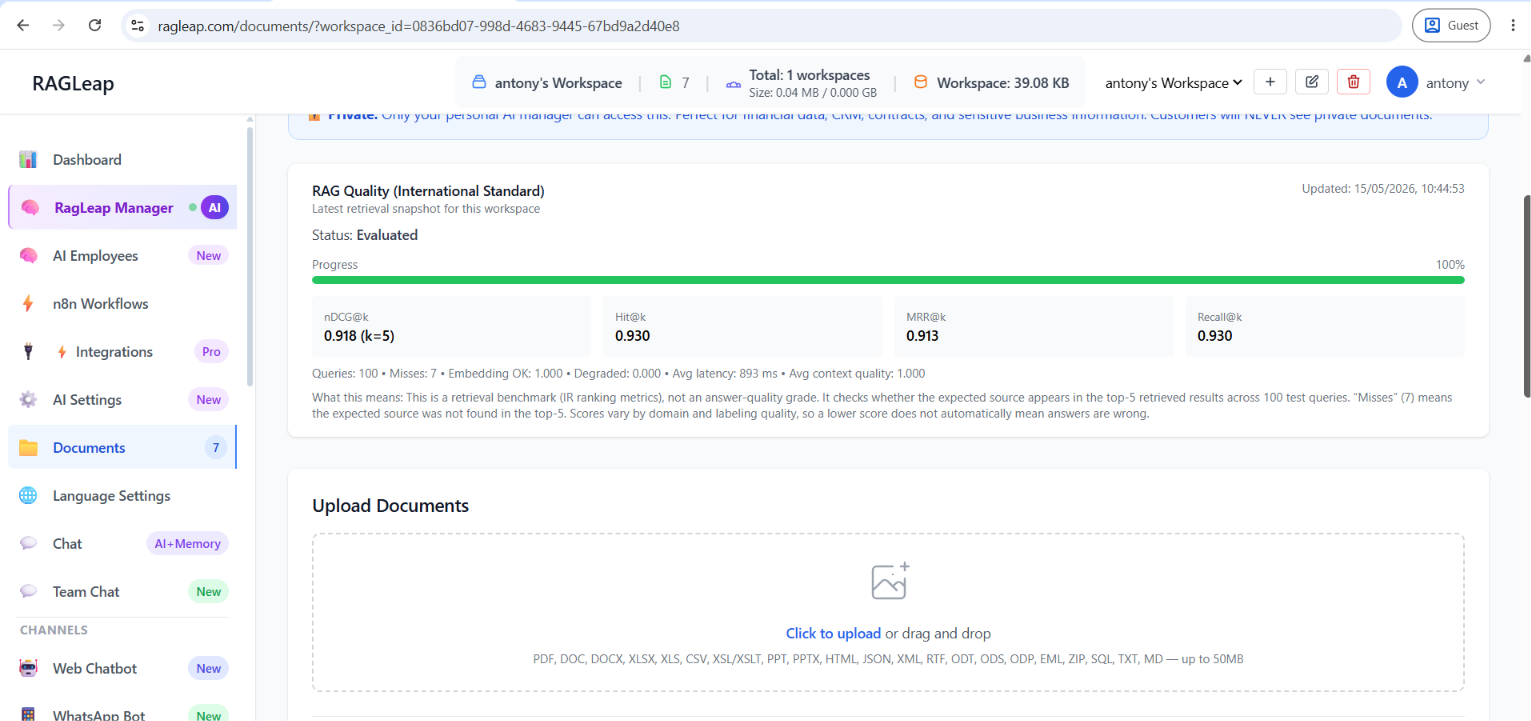
This is the foundation everything else depends on: the documents you upload here are what your AI actually knows. Without documents, your AI is guessing; with documents, every answer is grounded and cited.
How it works, in three steps:
- Upload — PDF, DOCX, TXT files, or paste a web URL directly
- Processing — automatically chunked, embedded, and indexed for retrieval-augmented generation (RAG)
- Chat — ask questions in Chat and get cited answers pulled directly from what you uploaded
Supported formats include PDF, DOC, DOCX, XLSX, XLS, CSV, XSL/XSLT, PPT, PPTX, HTML, JSON, XML, RTF, ODT, ODS, ODP, EML, ZIP, SQL, TXT, and MD — up to 50MB per file.
Public vs. Private document visibility
Public documents are used by customer-facing bots (WhatsApp, Telegram, Web) and your private Manager AI. Private documents are visible only to Manager AI — perfect for financial data, CRM exports, contracts, and anything customers should never see. Toggle visibility per document.
After documents are indexed, RagLeap runs an automatic retrieval benchmark and shows the results right on this page — the same nDCG@k / Hit@k / MRR@k / Recall@k scores referenced on the Dashboard.
Tip: upload your most frequently-asked-about documents first — price lists, hours, return policies — since these drive the majority of real customer questions.
5. Integrations — Connecting Your Existing Tools
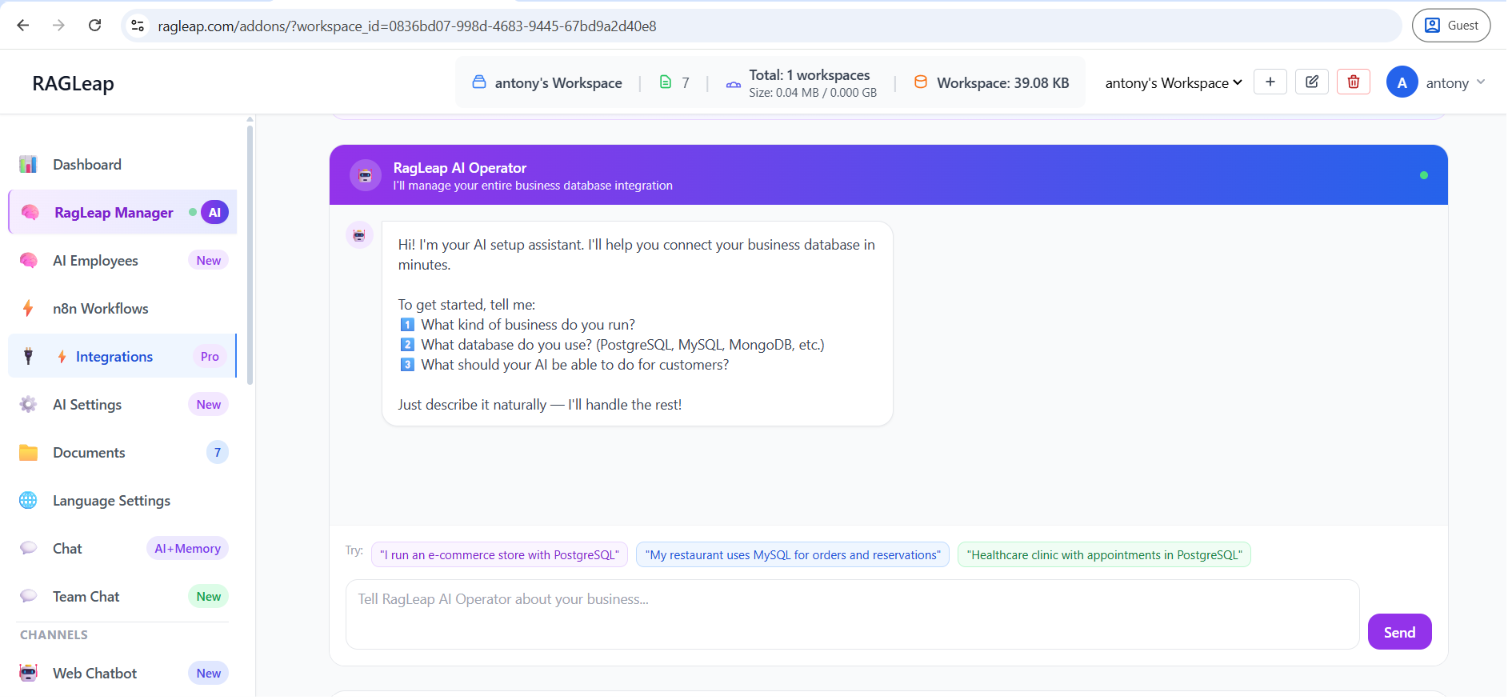
The Integrations page is where RagLeap connects to systems you're already running, rather than asking you to migrate everything into one platform. It includes AI-suggested automations tailored to each channel, developer-level automations for custom logic, and a dedicated place to upload data files directly into a workflow.
Database visibility here follows the same Public/Private security model as Documents — you control exactly what each connected system exposes to customer-facing bots versus what stays private to Manager AI.
6. n8n Workflows — No-Code Automation
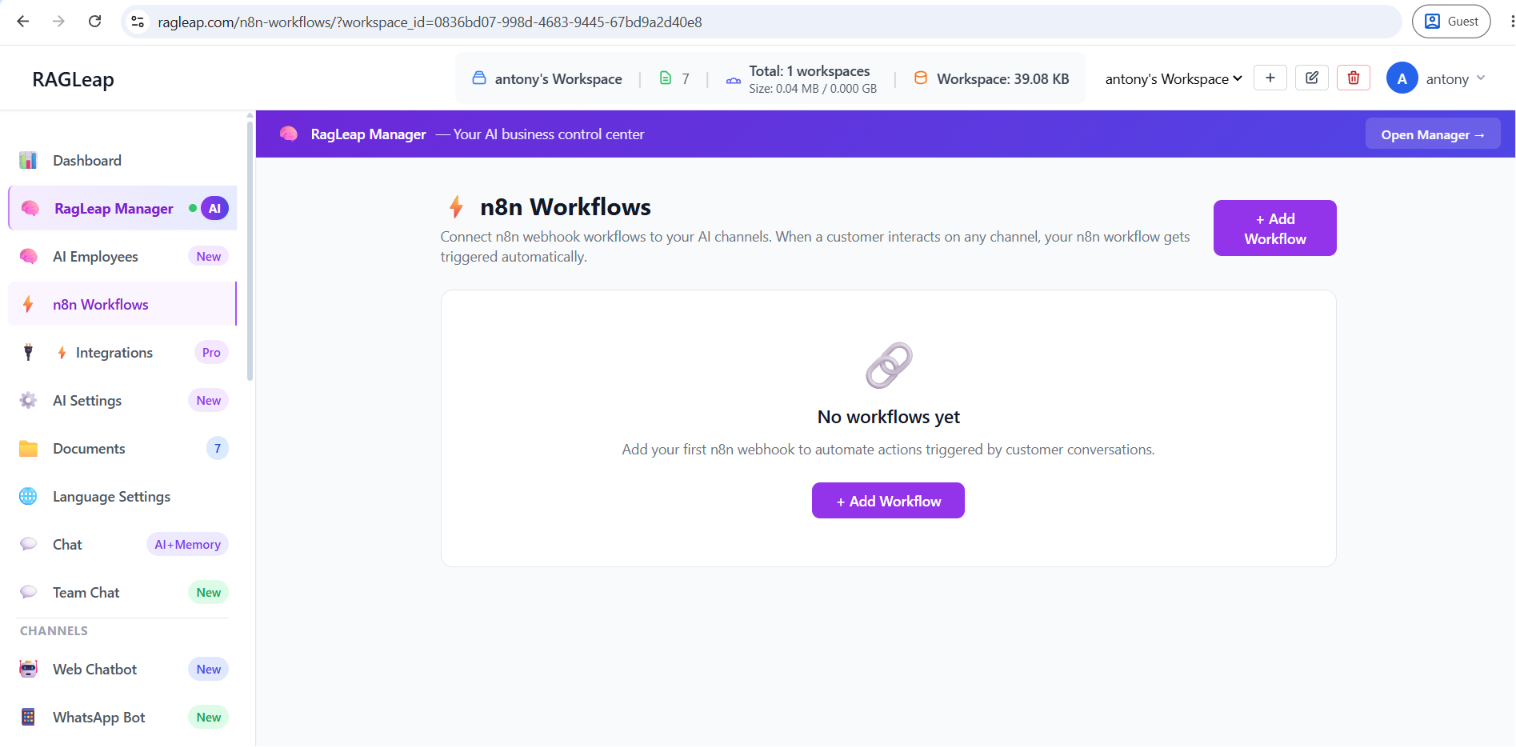
n8n is a popular open-source automation tool, and RagLeap connects directly to it — no code required. Once connected, your AI can trigger a workflow mid-conversation, on any channel:
- "Customer requested a callback" → automatically create a CRM lead
- "Order query flagged as urgent" → notify a Slack or Discord channel instantly
- "Appointment confirmed" → send a calendar invite or SMS reminder
Setup takes place at /n8n-workflows/: connect your n8n instance, then map specific trigger conditions to specific workflows. From that point on, it runs automatically across voice, WhatsApp, web chat, and Telegram alike.
7. Voice AI — Answering Real Phone Calls
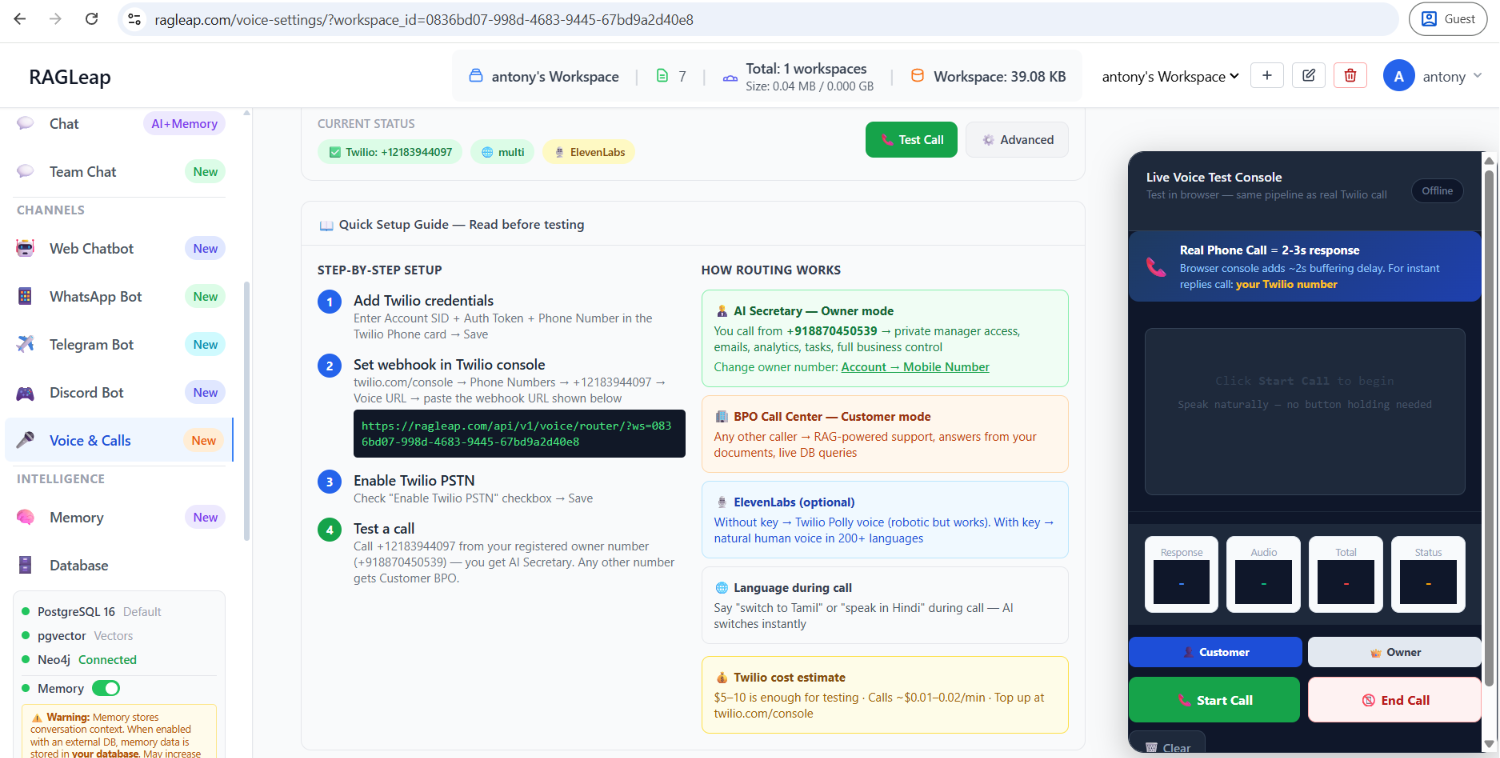
Voice is where RagLeap goes furthest beyond a typical chatbot: connect a Twilio phone number and RagLeap answers real inbound calls, using speech-to-text, an AI response engine, and text-to-speech — all in under 2-3 seconds of latency in production.
How call routing works:
Owner Mode (AI Secretary) — call from your registered owner number → you reach Manager AI, with full private access to emails, analytics, tasks, and business control.
Customer BPO Mode — any other number calling in → reaches RAG-powered customer support, with answers pulled from your documents and live database queries.
Setup, step by step:
- Add your Twilio Account SID, Auth Token, and Phone Number, then save
- Copy the generated webhook URL and paste it into your Twilio console under Phone Numbers → Voice URL
- Enable the "Enable Twilio PSTN" checkbox and save
- Test by calling your Twilio number from your registered owner number (reaches AI Secretary) or any other number (reaches Customer BPO)
Language is handled automatically — auto-detection listens and replies in the caller's language, and saying "switch to Tamil" or "speak in Hindi" mid-call changes the response language instantly. Choose between OpenAI TTS (works immediately with your existing key) or ElevenLabs (more natural-sounding, supports 200+ languages, requires your own key).
A built-in Live Voice Test Console lets you test the exact same pipeline in your browser before connecting a real number, with live Response, Audio, Total, and Status metrics.
8. WhatsApp Business Bot Setup
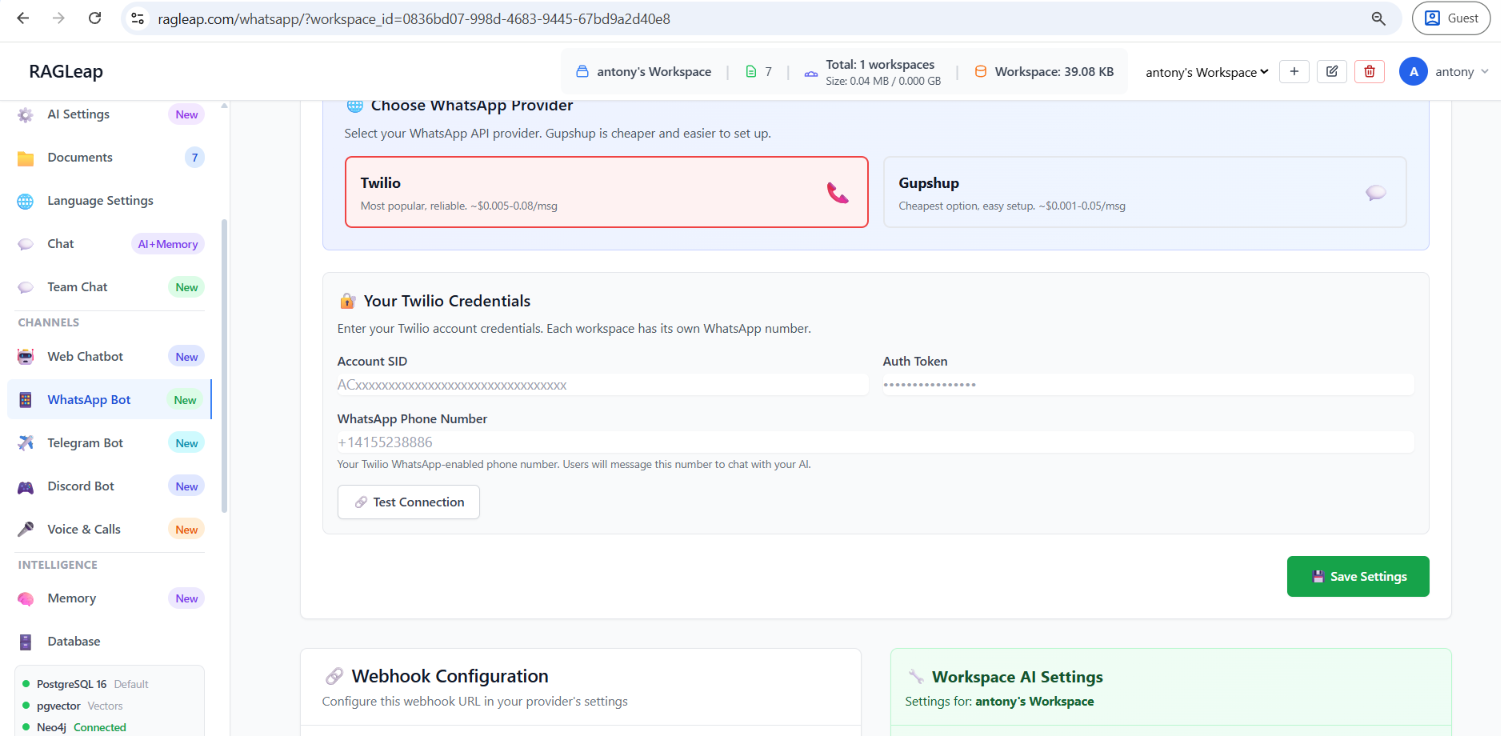
RagLeap supports two WhatsApp providers — pick whichever fits your business:
| Provider | Best for | Approx. cost |
|---|---|---|
| Twilio | Most reliable, best documentation | ~$0.005–0.08/msg |
| Gupshup | Cheapest, Indian company, fastest +91 approval | ~$0.001–0.05/msg |
⚠️ Use a dedicated number — never your personal WhatsApp
A phone number cannot run regular WhatsApp and the WhatsApp Business API at the same time. Once registered as a bot number, it can't be used normally again. Buy a fresh SIM (₹50–100 in India), or use a landline/VoIP number that can receive an OTP.
Twilio setup: create a Twilio account, get a sandbox or production WhatsApp number, copy your Account SID and Auth Token into RagLeap, test the connection, then set the webhook URL (https://ragleap.com/api/whatsapp/webhook/) in the Twilio console.
Gupshup setup: create a Gupshup account, create a WhatsApp app, copy your API Key and App Name into RagLeap, test the connection, then set the webhook ("Callback URL") to https://ragleap.com/api/whatsapp/gupshup-webhook/.
Once connected, share your bot number with customers — they message it directly to reach your AI.
9. Telegram Bot Setup
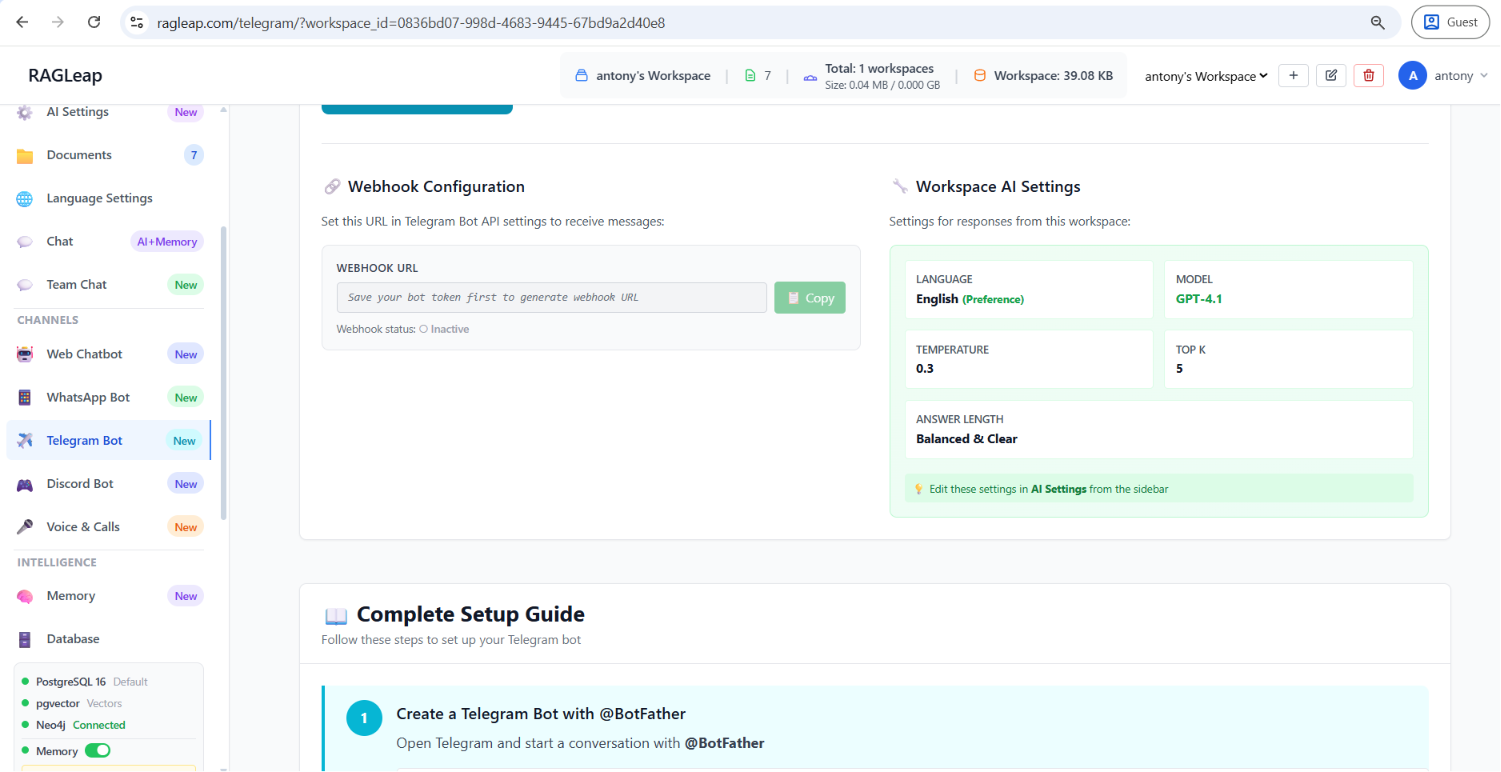
The fastest channel to set up — usually under two minutes:
- Open Telegram, message
@BotFather, and send/newbot - Follow the prompts to name your bot — BotFather gives you a Bot Token
- Paste that token into RagLeap's Telegram Bot page, toggle it on, and save
- Copy the generated webhook URL and register it with Telegram's API (a one-line browser or cURL call)
- Search your bot by username in Telegram and send a test message
If the bot doesn't respond, the most common cause is "Message Content Intent" not being properly enabled, or a stray space in the copied token.
10. Discord Bot Setup
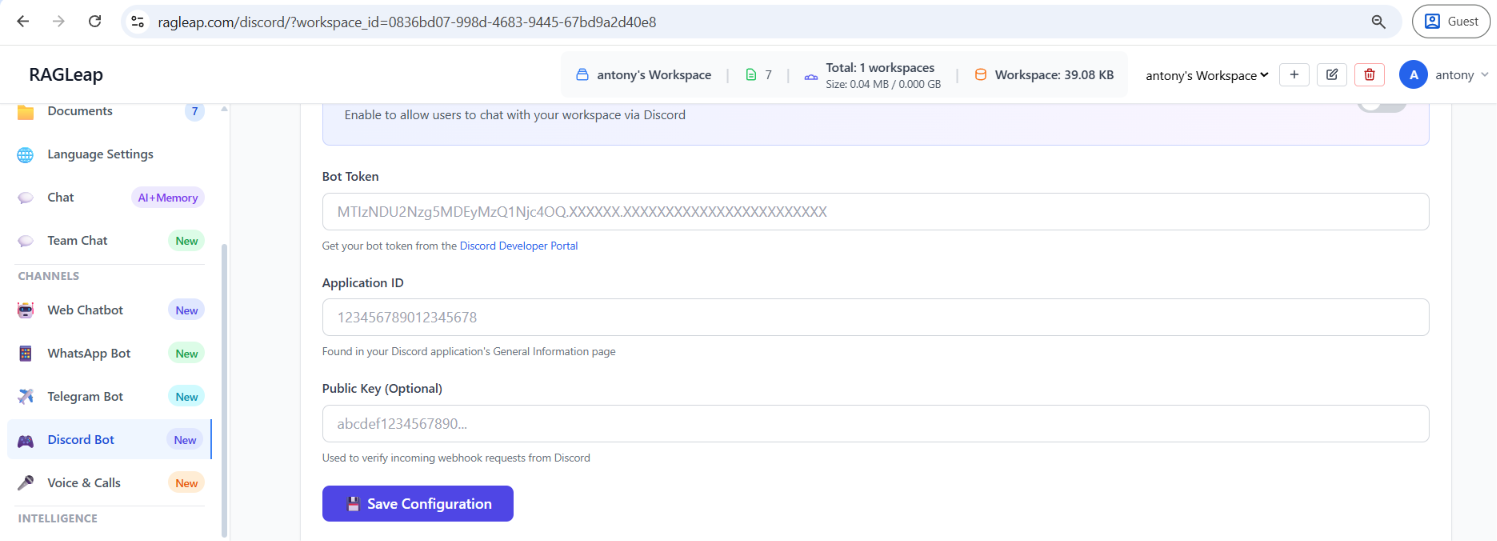
For businesses with an active Discord community, connect a bot through the Discord Developer Portal:
- Create a new application at the Discord Developer Portal, then add a Bot user and copy the Bot Token
- Enable "Message Content Intent" under Privileged Gateway Intents
- Paste the Bot Token and Application ID into RagLeap, toggle it on, and save
- Generate an OAuth2 invite URL with the
botscope and Send Messages / Read Message History / View Channels permissions, then invite it to your server - Mention the bot or send a message in any channel it can access — it responds using your uploaded documents
Discord bots built this way often show as "offline" in the member list — that's expected and normal for webhook-based bots; they still respond to every message.
11. Database — Cloud vs. Self-Hosted
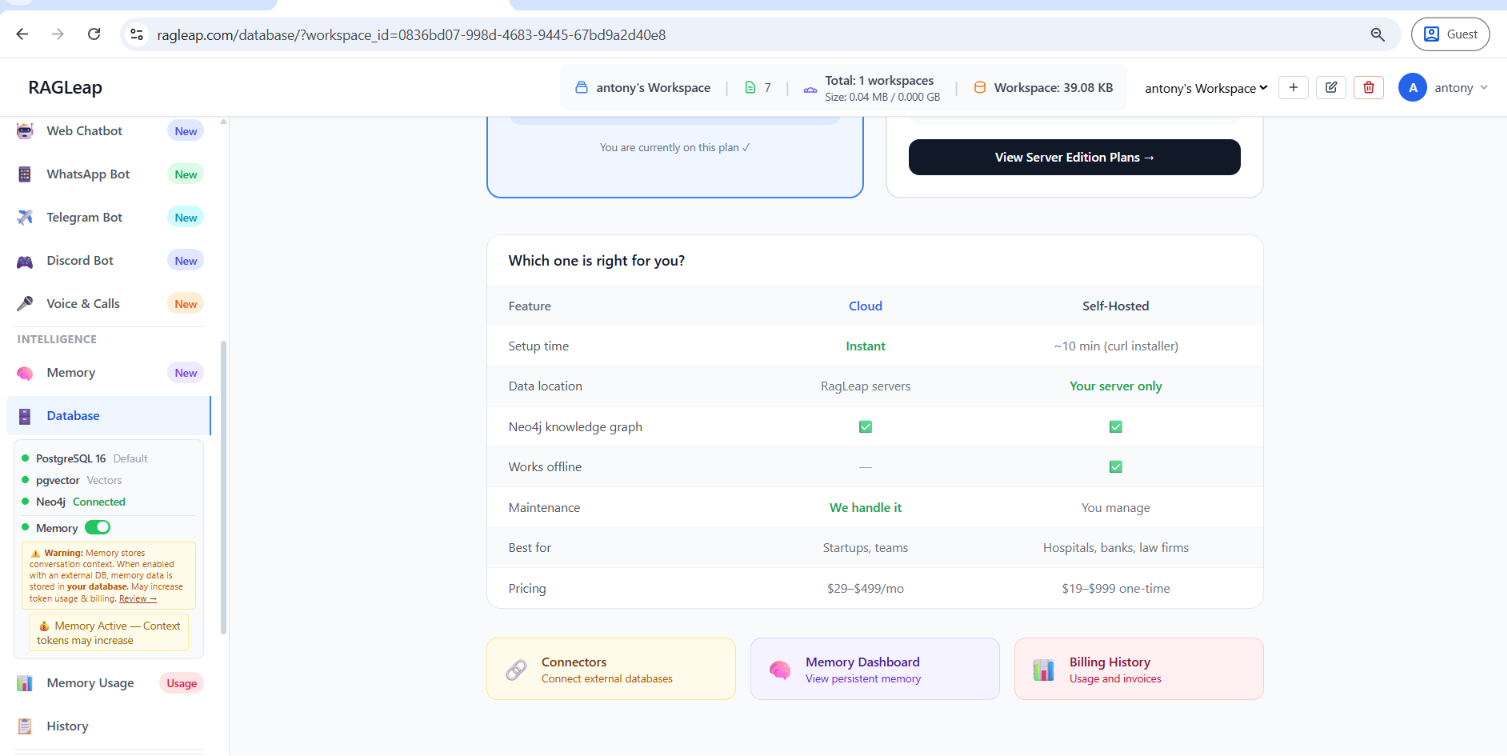
This page decides where your workspace data physically lives.
| Feature | Cloud | Self-Hosted |
|---|---|---|
| Setup time | Instant | ~10 min (curl installer) |
| Data location | RagLeap servers | Your server only |
| Neo4j knowledge graph | Included | Included |
| Works offline | — | Yes |
| Best for | Startups, teams | Hospitals, banks, law firms |
Cloud means zero configuration — upload documents and start chatting immediately, with automatic backups and a 99.9% uptime SLA. Self-Hosted means complete data privacy — nothing ever leaves your own infrastructure, ideal for regulated industries, with a one-time license fee instead of a monthly subscription.
12. Billing & Analytics — Credits, API Costs, and Usage
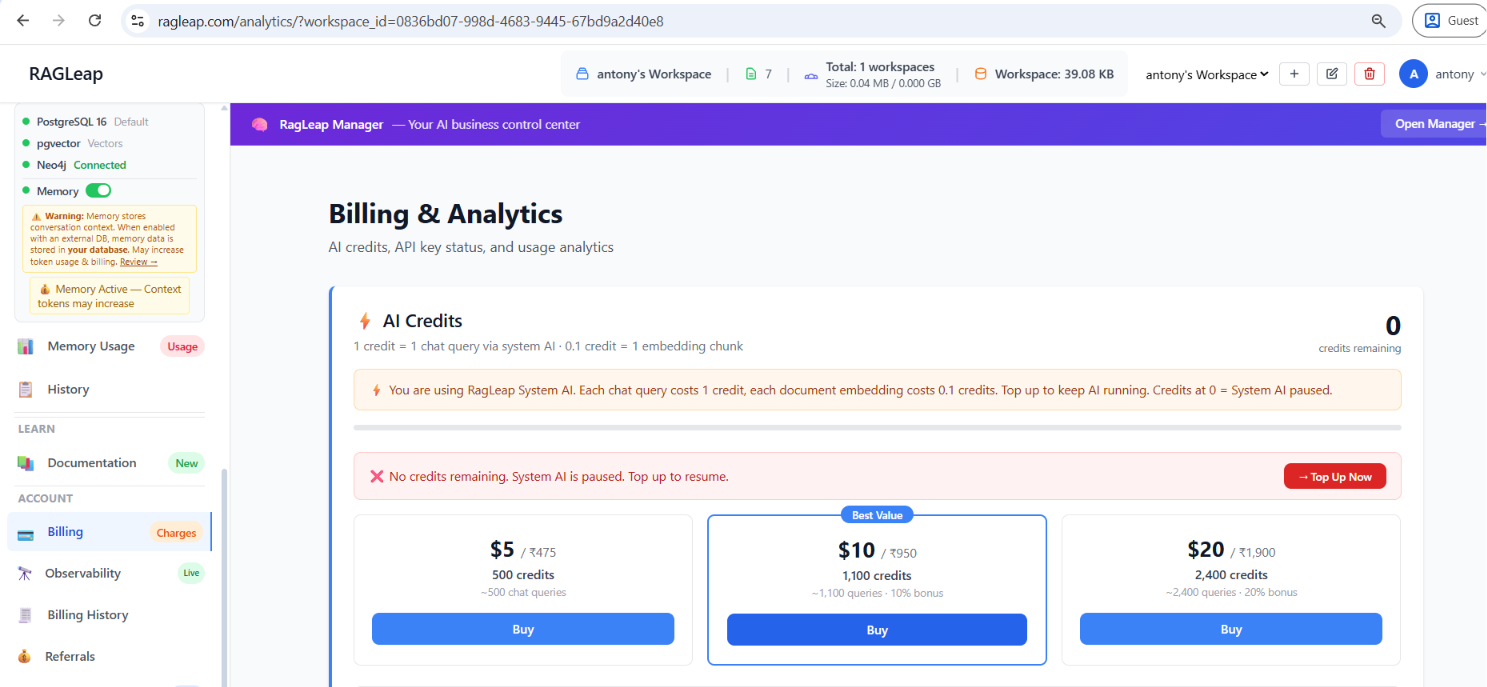
This page tracks AI credits, API key configuration, and cost — everything you need to understand what you're actually paying for.
AI Credits: 1 credit = 1 chat query via RagLeap's System AI; 0.1 credit = 1 embedding chunk. If you're using your own API key instead of the system key, no credits are charged at all — costs go directly to your provider account.
API Key Configuration Status shows exactly which key is powering each function (your own key vs. RagLeap's system key) and whether costs are tracked by RagLeap or billed directly to you by the provider.
A full cost breakdown is available per provider — Google Gemini, OpenAI, and Anthropic Claude — showing API calls, tokens used, and estimated cost for each, plus daily usage trends over 7, 30, or 90 days.
13. Persistent Memory Dashboard
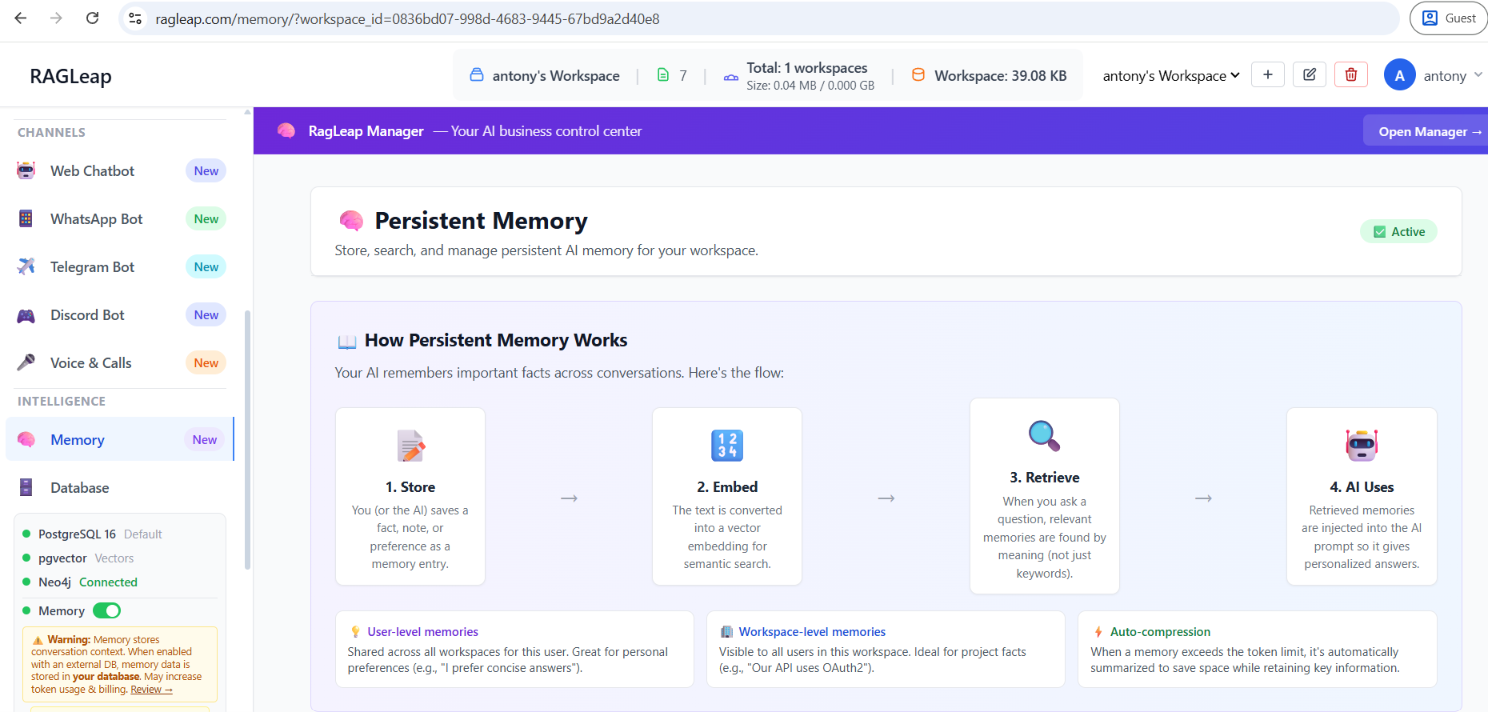
Most AI chat tools forget everything the moment a conversation ends. RagLeap's memory system is genuinely persistent — facts, preferences, and business rules are stored permanently and retrieved by meaning, not just by keyword.
How it works, in four steps:
- Store — you or the AI saves a fact, note, or preference as a memory entry
- Embed — the text is converted into a vector embedding for semantic search
- Retrieve — when a question comes in, relevant memories surface by meaning, not keyword matching
- Use — retrieved memories are injected into the AI's prompt, producing personalized, consistent answers
Memories are scoped as User-level (shared across all your workspaces, ideal for personal preferences) or Workspace-level (visible to your whole team, ideal for shared business facts like escalation rules or pricing policy). When a memory grows too large, it's automatically compressed to save space while keeping the key information intact.
Every stored memory is fully manageable from this page — searchable, editable, exportable as JSONL, or deletable individually or all at once.
14. Language Settings — 222+ Languages, Auto-Detected
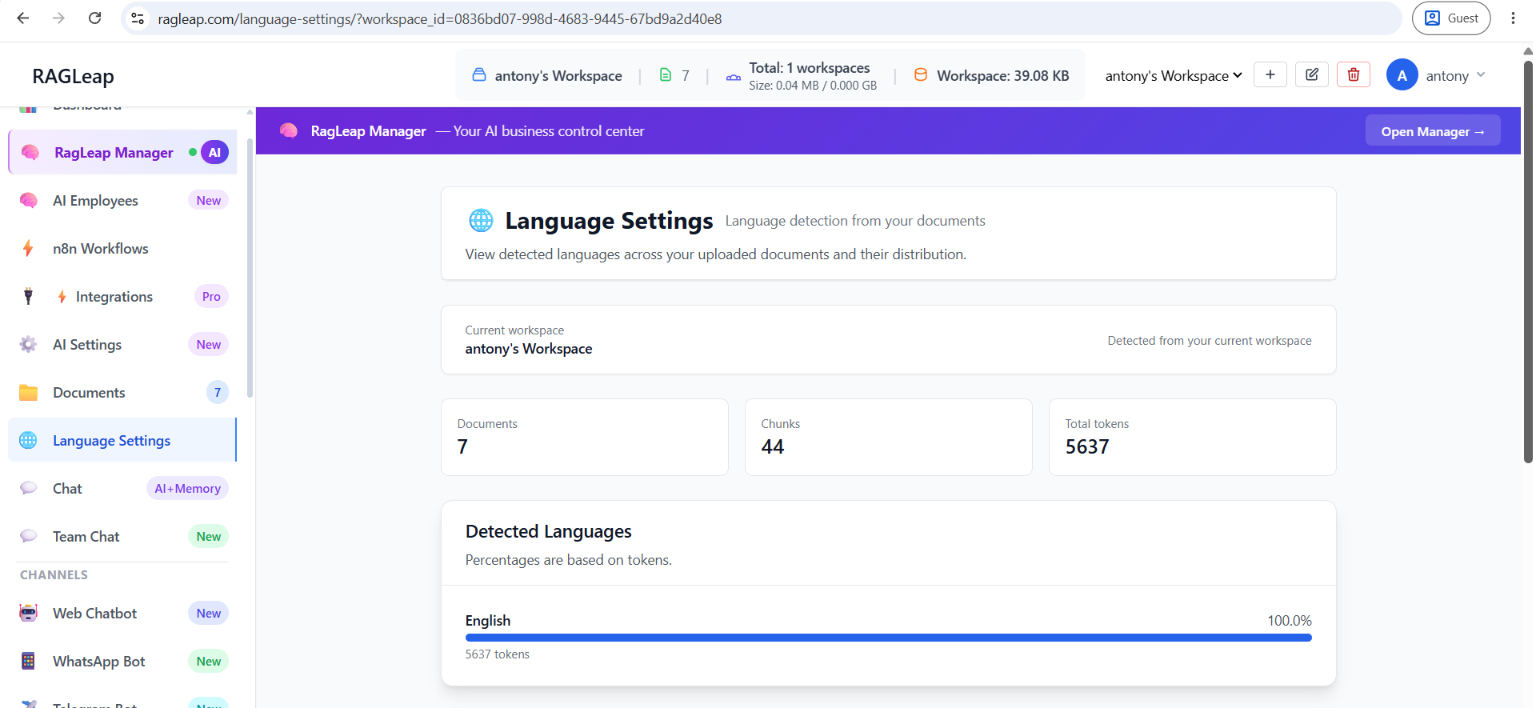
RagLeap scans your uploaded documents to show which languages are actually represented, with a token-based breakdown per language.
Chat Language Preference lets you choose the language your AI responds in, from over 222 built-in options, or add any custom ISO code manually if yours isn't listed (up to 2 languages total). Auto-detect query language, when enabled, matches whatever language the customer actually writes in — when disabled, the AI always replies in your preferred language regardless of the customer's input.
This setting is genuinely platform-wide: Web chat, WhatsApp, Telegram, Discord, and Voice all follow the same configuration, set once.
15. AI Settings — Model, Temperature, and Bring Your Own API Key
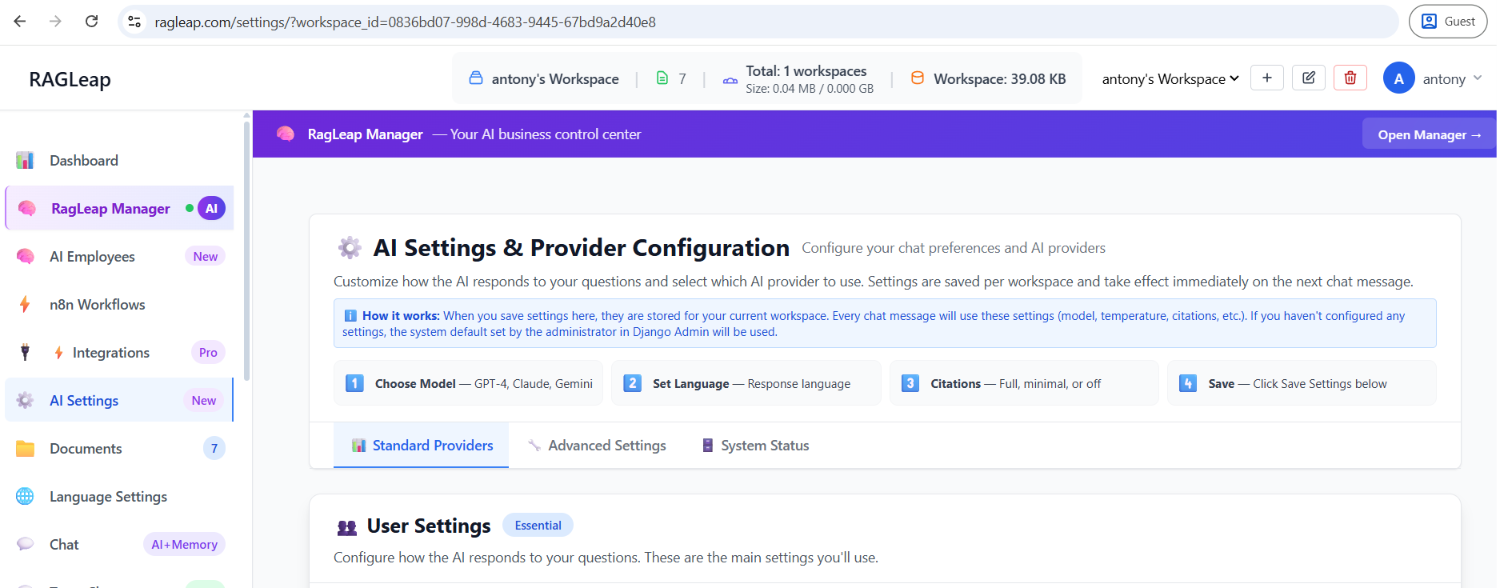
This is where you control exactly how the AI thinks and what it costs to run it.
Choose your model: Google Gemini (fast, recommended default), OpenAI GPT (creative, good for complex analysis), or Anthropic Claude (thoughtful reasoning, best for detailed analysis).
Bring your own API key — not limited to the three named providers. RagLeap also supports OpenRouter, Deepseek, Mistral, and a fully Custom API option that connects to any OpenAI-compatible endpoint — your own self-hosted model, a local LLM server like Ollama or vLLM, or any third-party inference API reachable by URL.
Fine-tuning controls under Advanced Settings include Temperature (0.0 for precise/factual answers, up to 1.0 for more creative responses — 0.2–0.4 is recommended for factual RAG answers) and Top-K Results (how many document chunks the AI reviews before answering; 3–8 works well for most businesses).
A Fallback Key Pool lets you add multiple API keys — if one hits a rate limit, RagLeap automatically tries the next one, so there's no downtime.
16. Account — Plans, Team, and Billing
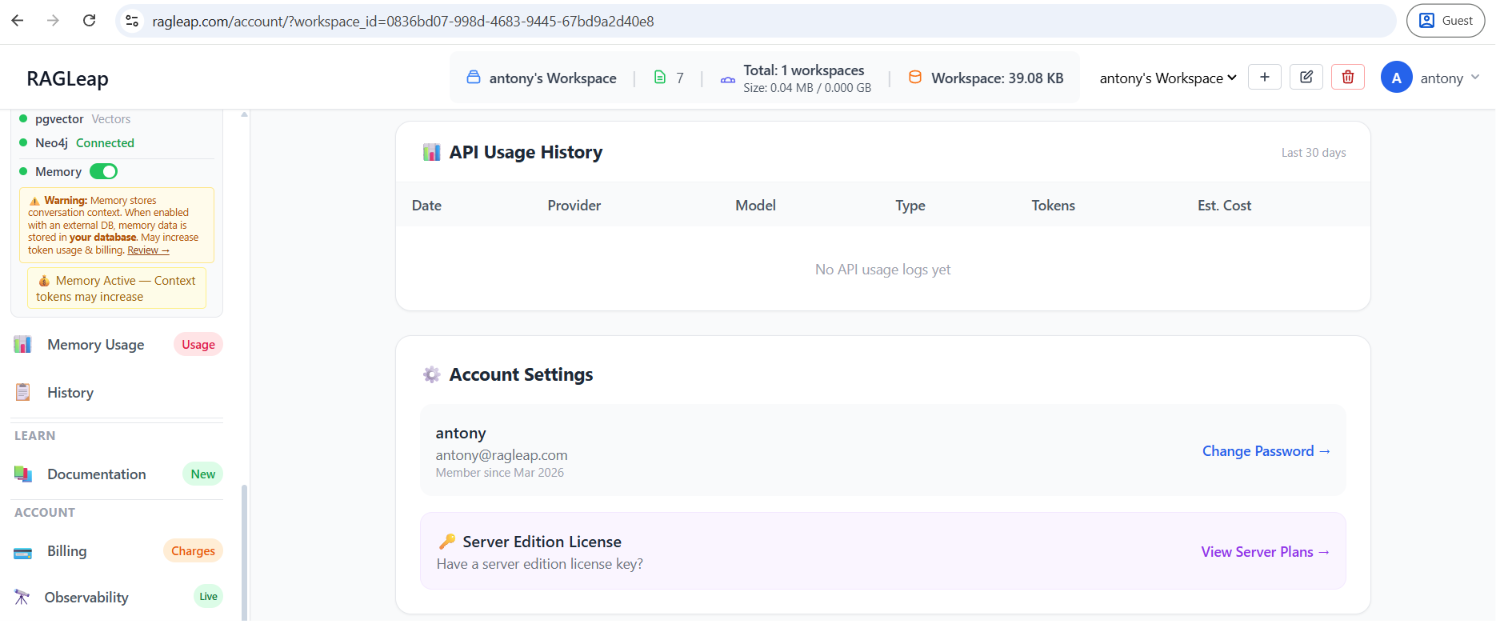
Manage your subscription, invite team members, and control permissions all from one place.
| Plan | Price | Workspaces | Key features |
|---|---|---|---|
| Starter | $29/mo | 1 | Web chatbot + AI Manager |
| Pro | $99/mo | 2 | + WhatsApp + Telegram |
| Business | $199/mo | 3 | + Voice, Team members, no branding |
| Enterprise | $499/mo | 5 | + SLA, dedicated support, custom integrations |
RagLeap is also free on your own server — a single workspace, web embed, and AI Manager with RagLeap branding, no subscription required.
Team Members (Business and Enterprise plans) can be added per workspace with fine-grained permission control, and grouped into Team Groups (Sales, Support, HR) to assign permissions in bulk.
17. Audit History — Who Changed What, and When
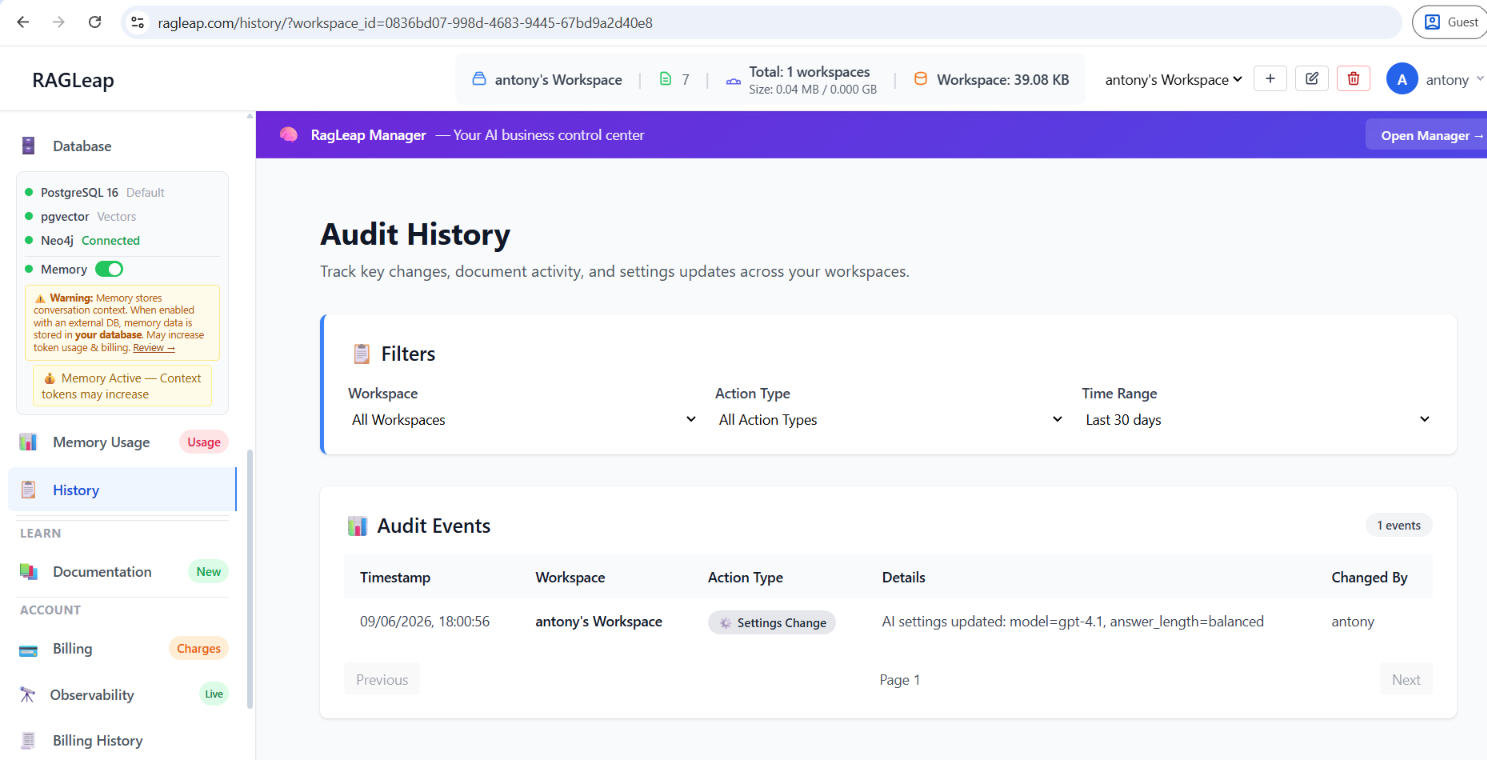
Every settings or configuration change across your workspaces is logged here — timestamp, workspace, action type, a plain-language description of what changed, and exactly who changed it. Filter by workspace, action type, or time range. This becomes essential the moment more than one person has admin access.
18. AI Chat — Testing Before You Deploy
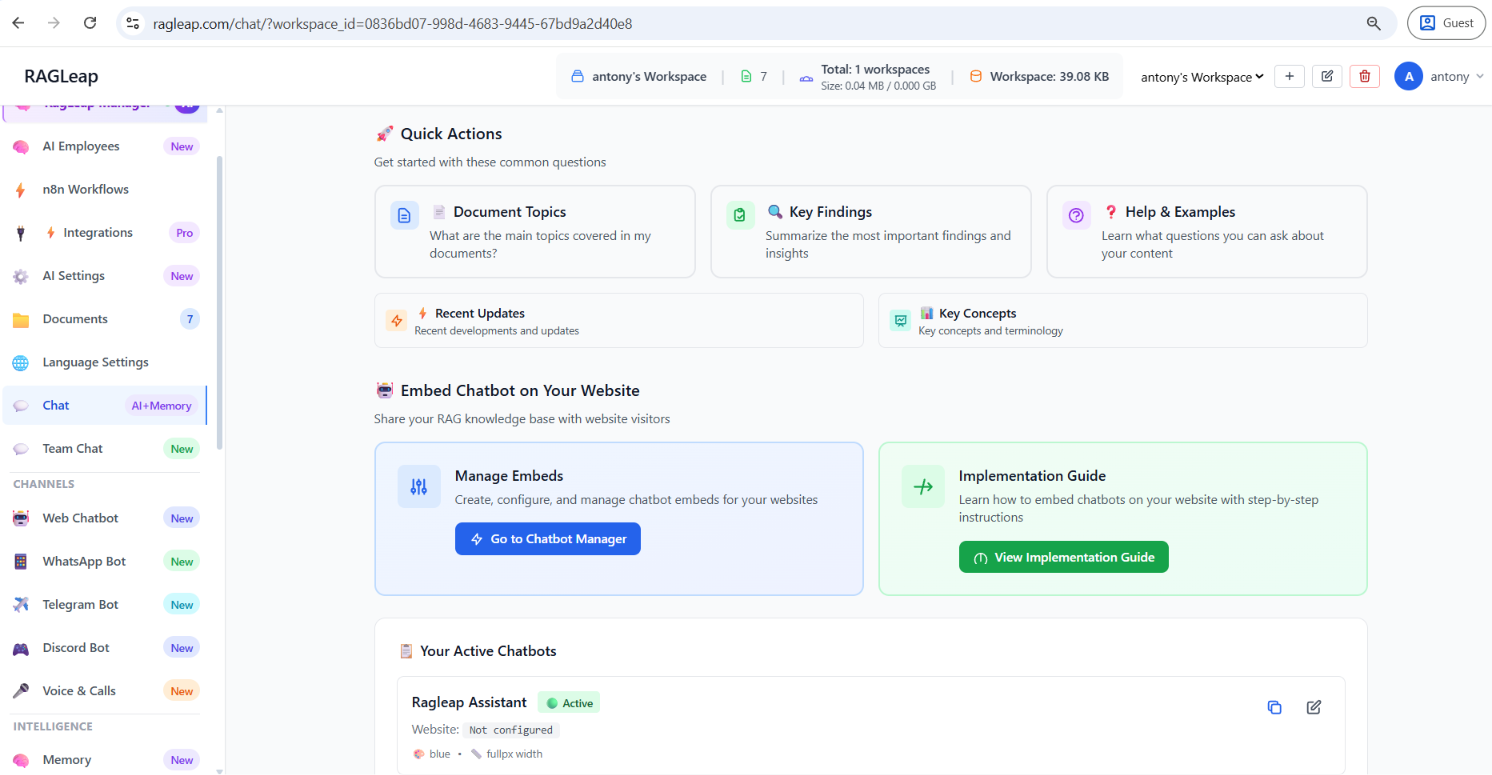
Before sharing anything externally, this page shows exactly what your customers will experience: ask a question, get an answer with citations, and see suggested follow-up questions generated from your own documents. It automatically follows whatever language you've set in Language Settings — change the language there, and the welcome message, prompts, and responses here update automatically, with no separate configuration needed.
Separately, Team Chat is a simple internal message board for your team — not connected to the AI at all, just plain messaging visible to everyone in the workspace.
19. Embedding the Chatbot on Your Website
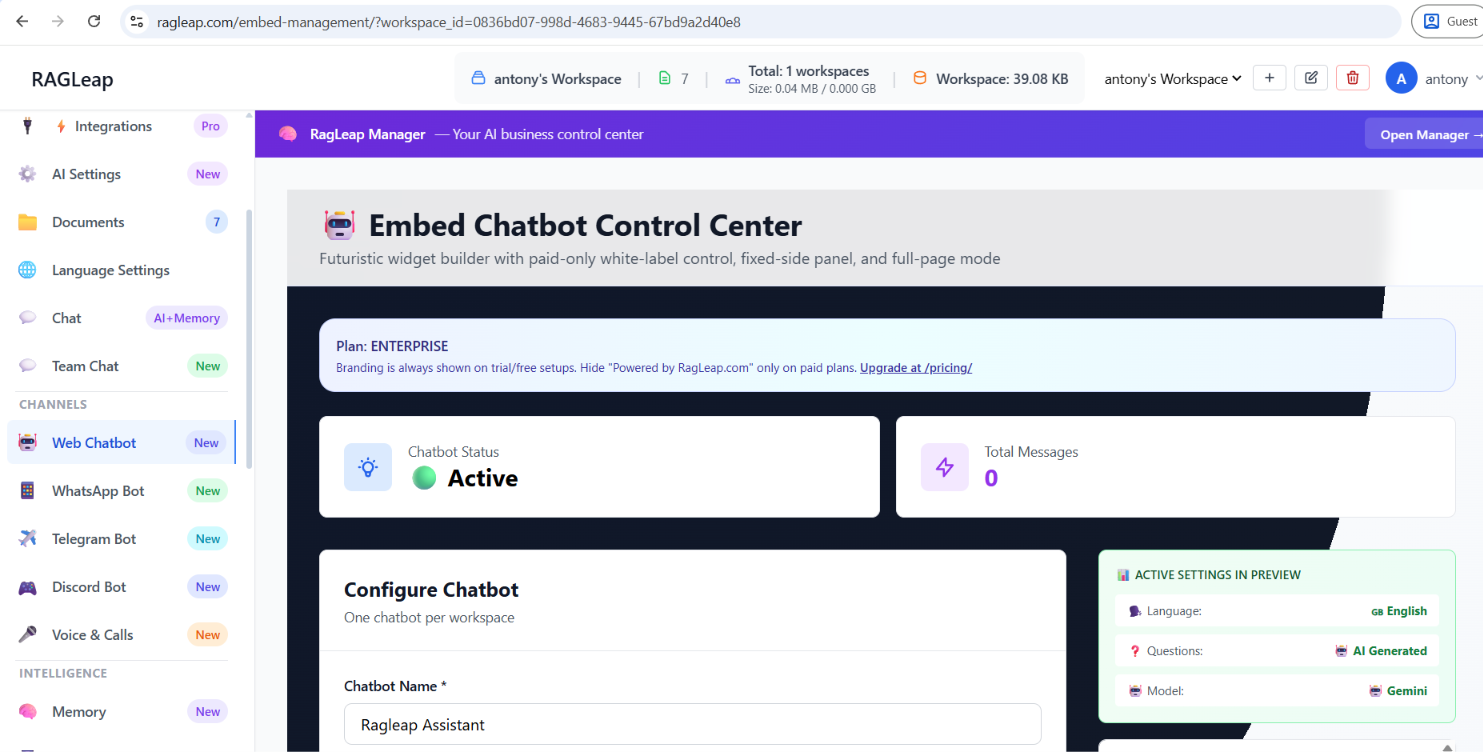
The Embed Chatbot Control Center generates a ready-to-paste code snippet for your own website, in three formats:
- Widget Bubble — a floating chat button, fully customizable (position, shape, color, size)
- Fixed Side Panel — pinned to the left or right edge of the screen
- Full Page or Inline iframe — for a dedicated support page
Configure the chatbot name, title, welcome message, and colors, then copy the generated embed code directly into your site. Branding ("Powered by RagLeap.com") is shown on trial/free plans, and can be hidden on paid plans.
20. Frequently Asked Questions
How long does it take to set up RagLeap?
Realistically under 15 minutes for a working AI: upload a handful of documents, connect one channel (WhatsApp or Web embed is fastest), test it in AI Chat, and go live. Voice, Memory tuning, and n8n automations can be layered on afterward.
Does RagLeap replace a customer support team?
It handles the majority of repetitive, predictable questions — pricing, hours, order status, FAQs — across every channel, 24/7, in 222+ languages. Complex, emotional, or judgment-based conversations still route to a human.
Can I use my own AI model instead of RagLeap's default?
Yes — bring your own API key from OpenAI, Gemini, Claude, OpenRouter, Deepseek, Mistral, or a fully custom OpenAI-compatible endpoint, including self-hosted models.
Is my data private?
Documents and database connections can be marked Private, meaning only your own Manager AI can see them — customers connecting through WhatsApp, Telegram, Discord, or the web widget never have access. Self-hosted deployment keeps all data on your own infrastructure entirely.
What languages does RagLeap support?
222+ built-in languages for customer-facing channels, with automatic detection, plus support for any custom ISO language code not in the built-in list.
Ready to see it running on your own business?
Start your free trial →